- Free YouTube to FLV Converter
- Free MP3 Editor
- Free Video to MP3 Converter
- Free PDF Creator
- Free Sound Recorder
- Free AMR to MP3 Converter
- Free MOV to AVI Converter
- Free DivX Converter
- Free Wave To MP3 Converter
- Free Aquarium Screensaver
- Free XLS Viewer
- Free PDF to Word Converter
- DriverHub
- Your Link Here
- This site for sale
- Free HD Video Converter Factory
- WonderFox DVD Ripper Speedy 13.
- Vartika Zimbra to PST Converter
- Free Android Data Recovery 1.1.
- Aiseesoft Video to GIF Converte
- Google Selection Search 1.0
- Apeaksoft Free HEIC Converter 1
- Best PDF to Word Converter 3.5
- MSG Files Without Email Client
- DriverHub 1.1.2
- MSG Viewer Freeware 4.0
- Read PST File Opener Free Downl
- Free Download EML File Reader T
- Easy Photo Studio Free for Wind
- Easy Photo Studio Free for Mac
- PST File Reader Without Outlook
- Free YouTube to FLV Converter
- Free MP3 Editor
- Free Video to MP3 Converter
- Free PDF Creator
- Free Sound Recorder
- Free AMR to MP3 Converter
- Free MOV to AVI Converter
- Free DivX Converter
- Free Wave To MP3 Converter
- Free Aquarium Screensaver
- Free XLS Viewer
- Free PDF to Word Converter
- DriverHub
- Your Link Here
- This site for sale

Download free program Free DVD to DivX Ripper 3.1.15 for free
Free rip and convert DVD to DivX formats for playback on DivX players WinX Free DVD to DivX Ripper is
Free rip and convert DVD to DivX formats for playback on DivX players
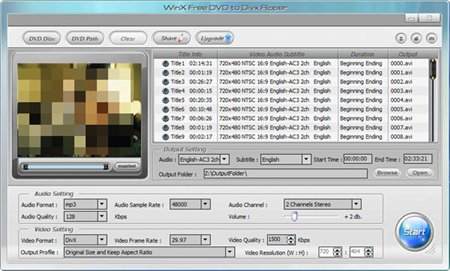
WinX Free DVD to DivX Ripper is a free DVD to DivX ripping software to rip and convert DVD movie or DVD segments to DviX formats for playing on players with fast speed and high quality. It enables you to free put DVD movies on DivX video players such as Archaos, iRiver PMP, Creative Zen vision, etc. Besides, with this free DVD to DivX ripper, you can extract DVD movie scenes out and save as JPEG, BMP pictures to colour your digi-life.
With in-built high quality video encoding engine, this free DVD to DivX ripper software provides you perfect visual/auditory enjoyment. And the brief interface will save you from complex operation in free DVD to DivX ripping.
Main Functions:
Special DVD to DivX Ripping:
- Steadily and freely rip/convert DVD to DivX video for smooth playback on Archaos, iRiver PMP, Creative Zen vision, etc.
- Support all DVD types, including DVD 5, DVD 9, DVD ROM, DVD-R, DVD+R, DVD-RW, DVD+RW.
- Rip DVD to JPEG, BMP picture files. You can make these pictures wallpaper at will.
Rich Editing Features:
- Subtitle/Audio Track – According to the original DVD, this free DVD to DivX ripper gives you the chance to choose subtitle and audio track in the Output Setting area.
- Clipping/Trimming – Not only allow you to free rip whole DVD to DivX, but also rip desired DVD segments to play on DivX players.
- Audio/Video Setting – This free DVD to DivX ripper permits you to customize the output video by adjusting Audio Format, Audio Sample Rate, Video Frame Rate, and Video Resolution and so on. You can also select Output Profile to get ideal video view size.