- Free OGG to MP3 Converter
- Free FLV to AVI Converter
- Free WMA to MP3 Converter
- Free MP3 To Wave Converter
- Free RM to MP3 Converter
- Free Mario Game
- Free XLS Viewer
- Free WAV to MP3 Converter
- Free Aquarium Screensaver
- Free DVDFab Decrypter
- Free Mobile 3GP converter
- Free PDF to Flash Converter
- Free MP4 to AVI Converter
- Free PDF to Word Converter
- Free MP3 to WAV Converter
- Free File List
- Free FLV to MP3 Converter
- Free Wallpaper Changer
- Free DVD to MPEG Converter
- Free Doc Convertor
- Free Audio Editor
- Free Video to WMV Converter
- Free YouTube to FLV Converter
- Free MP3 Editor
- Free Video to MP3 Converter
- Free PDF Creator
- Free Sound Recorder
- Free AMR to MP3 Converter
- Free MOV to AVI Converter
- Free DivX Converter
- Free Wave To MP3 Converter
- Free Aquarium Screensaver
- Free XLS Viewer
- Free PDF to Word Converter
- DriverHub
- Your Link Here
- This site for sale
- Free HD Video Converter Factory
- WonderFox DVD Ripper Speedy 13.
- Vartika Zimbra to PST Converter
- Free Android Data Recovery 1.1.
- Aiseesoft Video to GIF Converte
- Google Selection Search 1.0
- Apeaksoft Free HEIC Converter 1
- Best PDF to Word Converter 3.5
- MSG Files Without Email Client
- DriverHub 1.1.2
- MSG Viewer Freeware 4.0
- Read PST File Opener Free Downl
- Free Download EML File Reader T
- Easy Photo Studio Free for Wind
- Easy Photo Studio Free for Mac
- PST File Reader Without Outlook
- Free YouTube to FLV Converter
- Free MP3 Editor
- Free Video to MP3 Converter
- Free PDF Creator
- Free Sound Recorder
- Free AMR to MP3 Converter
- Free MOV to AVI Converter
- Free DivX Converter
- Free Wave To MP3 Converter
- Free Aquarium Screensaver
- Free XLS Viewer
- Free PDF to Word Converter
- DriverHub
- Your Link Here
- This site for sale

Download free program Smereka 0.9.13 beta for free
Extensible personal freeform database and personal information manager. What is Smereka? Smereka is a program that allows you to organize
Extensible personal freeform database and personal information manager.
What is Smereka?
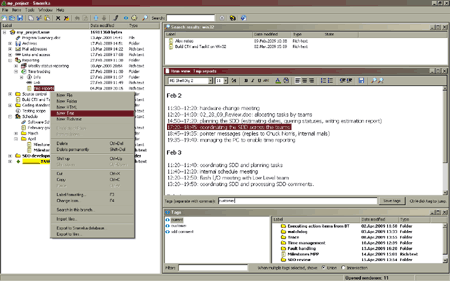
Smereka is a program that allows you to organize your data in an hierarchical, searchable database that is stored in a single file.
What is Smereka needed for?
Long-time users of personal computers accumulate a lot of various data. File system is a flexible and universal means of data storage. However, storing information in many separate files is not always a good idea.
If you have a lot of text notes, saved webpages or random files, organizing and navigating them can be difficult. Performing search over those pieces is possible only when you have special search services installed and activated on your computer. Not all of them support tags (text labels which are used by blog-services for organizing posts.)
In case you need to share some of your files with someone else, the recipient won t be able to use your search facility easily, even if it s installed on your machine. You will have to send one monolythic archive, which is almost totally unsearchable, and describe its contents independently in a the letter body.
Moreover, if you work with texts often and use "Word" to type and store your ideas, articles, snippets from the Internet or important emails, then you know how cumbersome it is to launch massive "Office" software to view a couple of paragraphs of text.
Features
- unlimited, freeform, ordered hierarchical organization of your information items (in a tree);
- instant, single-click item viewing and editing;
- item labels can have different colors and formatting;
- items may be assigned arbitrary icons in the item tree (free icons included);
- tree view shows item modification date and item type, in addition to icon and label;
- revisions of items can be saved to preserve entire history of edits; reverting to any prior revision is possible;
- reversible delete and undelete of items (recycle bin);
- single-click preview of revisions and deleted items;
- transparent indexing and instant fulltext search (across all data types including file attachments):
- intelligent import of disk files and folders;
- export item/branch to files; export item/branch to a new database;
- drag-and-drop item operations (copy and move of items and branches using your mouse) - on single or multiple selection of any size or depth;
- clipboard item operations (cut/copy/paste within a database or between databases - preserving tags, revisions, icons etc);
- easy items importing from other programs - no window swtiching required;
- you can edit multiple items at once; when you re done, review and save the modified items in a single window;
- single-file data storage for database portability;
- data type plugin interface for adding new data types;
- importer and exporter plugin interfaces for defining new import and export operations;
- user data backup and automatic error reporting;
- compressed data storage yielding small database files;
- fast operations regardless of the database size;
- SQLite database format widely supported by third-party database management tools;
- periodic update checks;
- detailed user manual;
- mainstream, user-friendly Windows interface