- Free OGG to MP3 Converter
- Free FLV to AVI Converter
- Free WMA to MP3 Converter
- Free MP3 To Wave Converter
- Free RM to MP3 Converter
- Free Mario Game
- Free XLS Viewer
- Free WAV to MP3 Converter
- Free Aquarium Screensaver
- Free DVDFab Decrypter
- Free Mobile 3GP converter
- Free PDF to Flash Converter
- Free MP4 to AVI Converter
- Free PDF to Word Converter
- Free MP3 to WAV Converter
- Free File List
- Free FLV to MP3 Converter
- Free Wallpaper Changer
- Free DVD to MPEG Converter
- Free Doc Convertor
- Free Audio Editor
- Free Video to WMV Converter
- Free YouTube to FLV Converter
- Free MP3 Editor
- Free Video to MP3 Converter
- Free PDF Creator
- Free Sound Recorder
- Free AMR to MP3 Converter
- Free MOV to AVI Converter
- Free DivX Converter
- Free Wave To MP3 Converter
- Free Aquarium Screensaver
- Free XLS Viewer
- Free PDF to Word Converter
- DriverHub
- Your Link Here
- This site for sale
- Free HD Video Converter Factory
- WonderFox DVD Ripper Speedy 13.
- Vartika Zimbra to PST Converter
- Free Android Data Recovery 1.1.
- Aiseesoft Video to GIF Converte
- Google Selection Search 1.0
- Apeaksoft Free HEIC Converter 1
- Best PDF to Word Converter 3.5
- MSG Files Without Email Client
- DriverHub 1.1.2
- MSG Viewer Freeware 4.0
- Read PST File Opener Free Downl
- Free Download EML File Reader T
- Easy Photo Studio Free for Wind
- Easy Photo Studio Free for Mac
- PST File Reader Without Outlook
- Free YouTube to FLV Converter
- Free MP3 Editor
- Free Video to MP3 Converter
- Free PDF Creator
- Free Sound Recorder
- Free AMR to MP3 Converter
- Free MOV to AVI Converter
- Free DivX Converter
- Free Wave To MP3 Converter
- Free Aquarium Screensaver
- Free XLS Viewer
- Free PDF to Word Converter
- DriverHub
- Your Link Here
- This site for sale

Download free program FBackup 4.4 for free
FBackup is a free backup software for both personal and commercial use. It protects your important data by backing it
FBackup is a free backup software for both personal and commercial use. It protects your important data by backing it up automatically to any USB/Firewire device, local or network location. The backed up data can be either compressed (using standard zip compression) or an exact copy of the original files.
Main Features
It’s free for personal and commercial purposes.
FBackup is a backup software free for both commercial and personal use. This means that you can save some money by not having to buy another backup program.
Automatic backups.
You define a backup job, set it to run automatically, and forget about it. FBackup will automatically run the backup at the scheduled date, so you have the benefit not only of having your data protected, but you ll also save precious time.
Backup with standard zip compression.
When using the full backup type, the sources will be archived using standard zip compression. FBackup uses ZIP64 compression, which means that it can create zip files over 2GB in size. Furthermore, you can protect the zip file by requiring a password for extracting data from it.
Exact copies of files.
If you donot want to have the files stored in one zip file, FBackup can make exact copies of the backup sources. Since FBackup will also back up empty folders, you can use this backup type to create in the destination a "mirror" copy of the original files.
Run actions before/after backup.
For each backup job you can define an action to execute before or after the backup. As an example, you can set a "Clear backup" action before the backup runs, so that all the previous backed up files will be cleared before loading the new ones. As an after-backup action, you can set it to stand by, log off, hibernate or even shut down the computer once the backup successfully finished.
Easy to use.
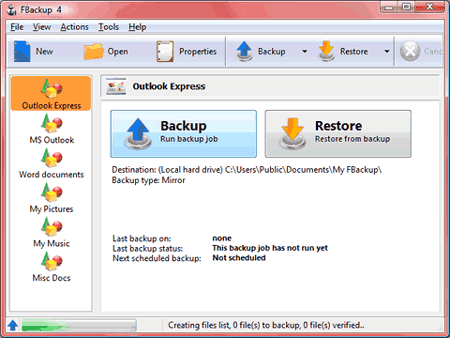
The two main functions of a backup program are the backup and restore operations. FBackup makes them easy for you, by offering friendly wizards. You start a new backup wizard, select what, where, how and when to backup, and the backup is ready to run. If you have to restore files, you ll open a restore wizard and it will ask you where you want the files to be restored.
Automatic updates.
FBackup automatically checks for updates weekly, so you ll know when a new version is released. The option to check for updates can be disabled, but we recommend to let it enabled so that FBackup will be up-to-date.
Multiple backup destinations.
By default the location where your backups will be stored is the local windows partition. To be sure you have a secure backup, you ll need to store the backups on other destinations supported by FBackup (such as an external USB/Firewire drive, or on a mapped network drive). This way, if your computer would suffer a hardware failure, you ll have your data safe on an external location.
Backup plugins.
You can load plugins for backing up or restoring specific programs settings or other custom data (like game saves, email data, etc.). Once loaded in FBackup, these plugins will add in the Predefined Backups list the sources needed to be backed up for that particular program. You can see a list of all the available backup plugins here: Free Backup Plugins.
Backup open files.
If a file is in use by another program at the time of the backup, FBackup will still be able to back up that file, because it uses the Volume Shadow Service that Windows provides. So, as long as you re on Windows XP, Windows Vista, Windows 2003 Server or Windows 2008 Server, FBackup will back up those open files. As an example, you will be able to back up your Outlook emails and settings without closing it first.
FBackup is a free file backup software, it is not recommended for full system backups (image backups).