- Free OGG to MP3 Converter
- Free FLV to AVI Converter
- Free WMA to MP3 Converter
- Free MP3 To Wave Converter
- Free RM to MP3 Converter
- Free Mario Game
- Free XLS Viewer
- Free WAV to MP3 Converter
- Free Aquarium Screensaver
- Free DVDFab Decrypter
- Free Mobile 3GP converter
- Free PDF to Flash Converter
- Free MP4 to AVI Converter
- Free PDF to Word Converter
- Free MP3 to WAV Converter
- Free File List
- Free FLV to MP3 Converter
- Free Wallpaper Changer
- Free DVD to MPEG Converter
- Free Doc Convertor
- Free Audio Editor
- Free Video to WMV Converter
- Free YouTube to FLV Converter
- Free MP3 Editor
- Free Video to MP3 Converter
- Free PDF Creator
- Free Sound Recorder
- Free AMR to MP3 Converter
- Free MOV to AVI Converter
- Free DivX Converter
- Free Wave To MP3 Converter
- Free Aquarium Screensaver
- Free XLS Viewer
- Free PDF to Word Converter
- DriverHub
- Your Link Here
- This site for sale
- Free HD Video Converter Factory
- WonderFox DVD Ripper Speedy 13.
- Vartika Zimbra to PST Converter
- Free Android Data Recovery 1.1.
- Aiseesoft Video to GIF Converte
- Google Selection Search 1.0
- Apeaksoft Free HEIC Converter 1
- Best PDF to Word Converter 3.5
- MSG Files Without Email Client
- DriverHub 1.1.2
- MSG Viewer Freeware 4.0
- Read PST File Opener Free Downl
- Free Download EML File Reader T
- Easy Photo Studio Free for Wind
- Easy Photo Studio Free for Mac
- PST File Reader Without Outlook
- Free YouTube to FLV Converter
- Free MP3 Editor
- Free Video to MP3 Converter
- Free PDF Creator
- Free Sound Recorder
- Free AMR to MP3 Converter
- Free MOV to AVI Converter
- Free DivX Converter
- Free Wave To MP3 Converter
- Free Aquarium Screensaver
- Free XLS Viewer
- Free PDF to Word Converter
- DriverHub
- Your Link Here
- This site for sale

Download free program Quick Startup 2.3 for free
When you turn on your computer certain applications, drivers, and services are automatically started at the beginning of each Windows
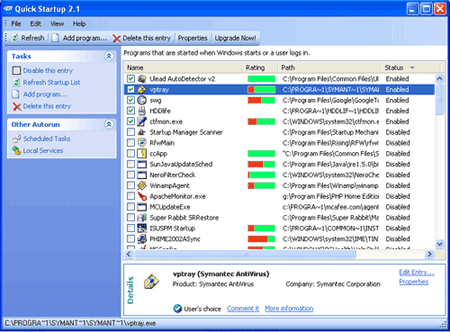
When you turn on your computer certain applications, drivers, and services are automatically started at the beginning of each Windows session. The information that tells Windows to automatically start these items can be located in a number of places, ranging from a program group on your Start Menu, to certain initialization files that are executed when Windows starts, to one of many places in the system registry. The StartUp manager tool lets you centrally manage all of these items using one single interface. Using the StartUp manager you can easily add, remove, edit, disable, and enable any and all of these "startup items" in order to keep your system s boot-up process as fast and efficient as possible.
How do I find out if a program that starts automatically is necessary?
When you select a startup entry in the list, StartUp Manager displays detailed information on the program in the Details box at the bottom of the window. You can easily determine whether or not you wish to have the program started on the basis of the Product name and Company. If you have never heard of the company or the product, then the entry is probably not needed.You can also find it s more information from internet ,to do this,right click your mouse and select Search Google on the popup menu.
Deactivating and deleting entries
Unmark the check box in front of an entry to disable it, and the program will no longer be started the next time you start Windows. In this way, you can find out for certain whether the entry is needed. If something doesn t work properly the next time you start Windows, all you have to do is select the check box again.
If you are certain that you no longer need an entry, you can remove it from the list entirely by clicking Delete this entry .
Adding a new startup entry
If you wish to add a program to one of the startup folders yourself, click Add program... .
Enter the name of the desired application in the dialog and enter the directory path of the program file in the Path/Command Line box. You can use the Find button to help you find the file.
You may also edit any of the existing listed items in order to move them from one location to another, change their program description, or update the command line that is being used to start the item.
- Browse all startup entries in an elegant list view.
- Security risk rating for startup entries.
- Get detailed information about individual startup entries.
- Add, edit or delete startup entries
- Simple and User friendly interface